 Taskriz
 for Business Taskriz for Developers → Taskriz for Software Companies →
Requests to the people
your business works with.
Get the trades, suppliers and customers on a job lined up without the calls. Ask each one for what you need (a day, a photo, a quote, a sign-off) and get a complete answer back.
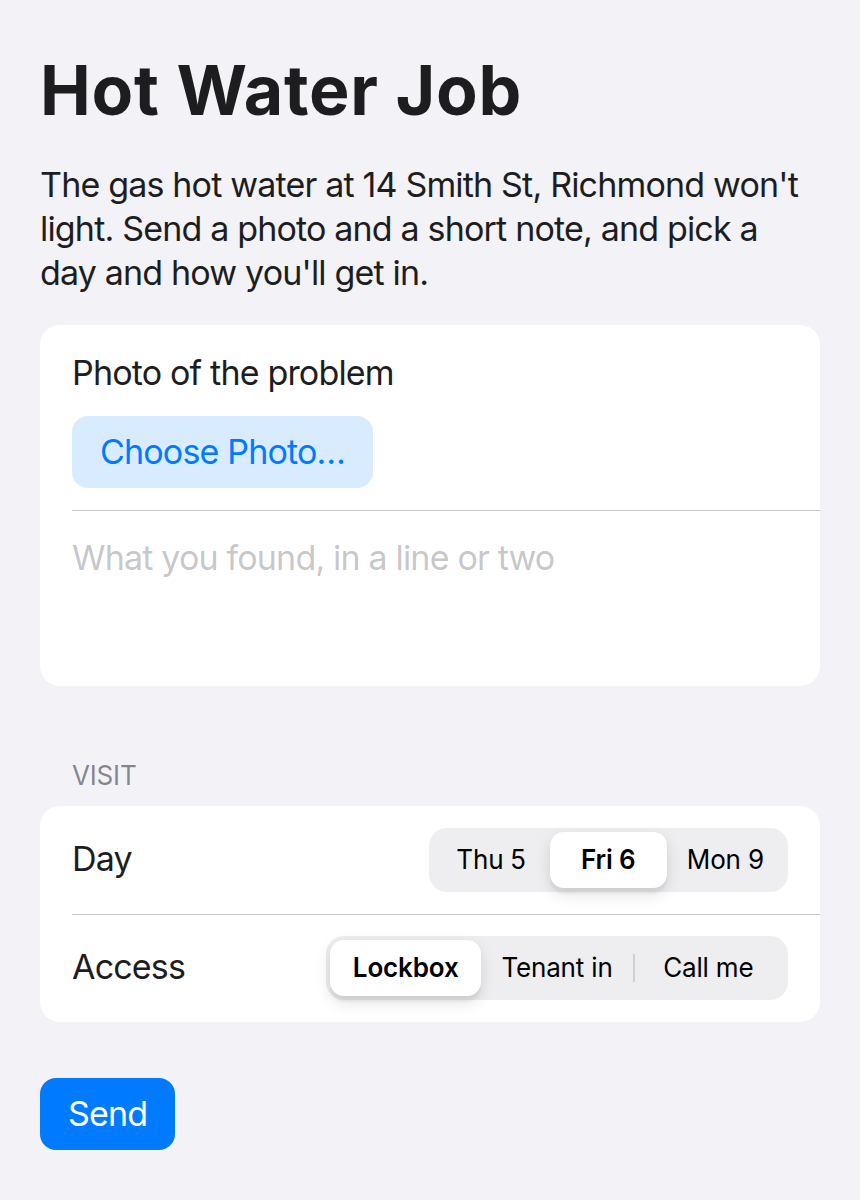
A new hot water heater at a rental means the plumber, the tenant and the owner, and a dozen calls, texts and emails between them. With Taskriz you ask each of them once: the plumber picks a day and sends a photo, the owner approves the quote, and every answer comes back to your inbox, complete. When they ask you for something, it arrives complete too. No portal, no app, no account, no chasing.
Free to start. No credit card. The people you ask never pay.
Send this to your tech team · Talk to our team
Building with AI Agents? Taskriz for developers →
- Try the live demo — no sign-up
- Live since October 2026
- Requests sealed to the devices of the person you ask
- An Australian company
- Free for the people you ask, always
Reaches your trades, suppliers and customers through
- Any browser, phone or computer
- Text message (Australia and the US)
- ChatGPT
- Claude
- Your own website
One way to reach everyone on the job, whatever they use. People in ChatGPT or Claude can answer right in the chat, or start a request with your business there.
The problem
Every job waits on
someone else’s answer.
Getting one job done means lining up people who don’t work for you: trades, suppliers, tenants, owners, customers. Think about what your team sends in a week:
- “Can you get to 14 Smith St this week?”
- “Send us a photo of the old unit, and a price.”
- “Is the tenant home Friday, or do we use the lockbox?”
- “The quote is attached. Can you approve it?”
Each one is a call, a text or an email, and the answers land in different places, half-finished, days later. Your team spends the day chasing and passing messages on, and the job, the tenant and the owner all wait.
Taskriz is one way to reach all of them. Your trades and suppliers answer in one tap, with no app and no account needed, and every answer comes back to one place.
The difference
A message starts a conversation.
A screen gets it done.
Hi, can you send us a photo of the leak, and let us know a time next week for the visit?
Sure, will do tonight
Sorry, forgot! Tuesday maybe? Morning?
Tuesday 8–10 or 10–12? And the photo when you can, thanks.
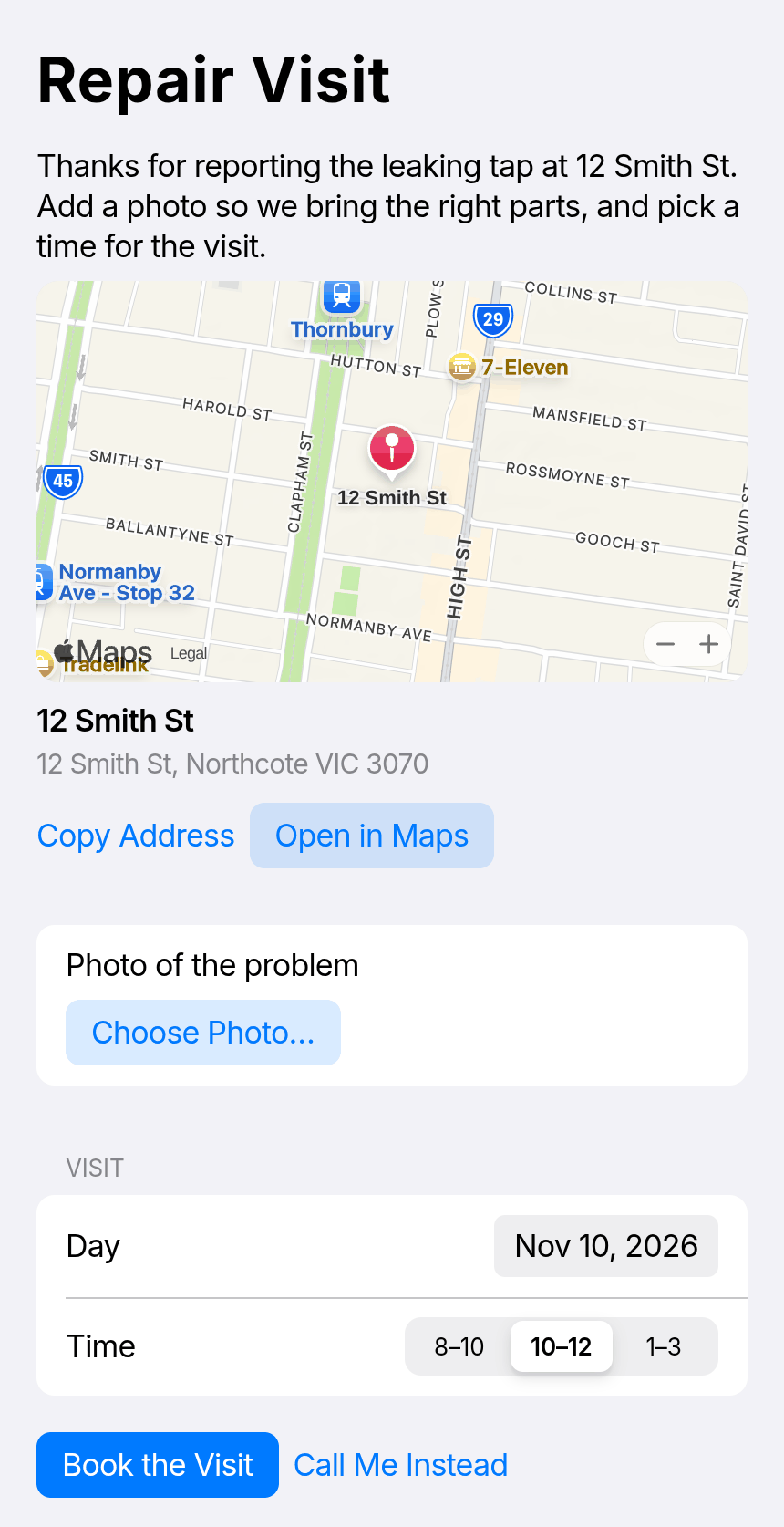
Every answer can lead to the right next step.
Each answer can bring the next request on the same conversation, made from what the person said: a tenant who can’t make Tuesday gets the next times, picks one, and the reminder arrives in the same thread. Read the story behind it ›
When they ask you
When tenants and customers come to you,
they arrive ready.
A contact form hands you a note, for your team to read, call back about and chase before the job can start. With Taskriz, they get the right form for what they want, so what reaches you is a complete request you can pass straight to the right trade.
hi my tap is leaking can someone come
- What they asked for
- Repair: leaking tap
- In their words
- “hi my tap is leaking can someone come”
- Where
- 12 Smith St, Northcote
- How urgent
- Leaking steadily, not flooding
- Best time
- Weekday mornings
- Photo
- 1 attached
- Contact
- Sam Lee · sam@example.com · 0400 000 000
It works from the request box on your website, and from actions you offer: “Report a problem”, “Book a service”, “Request a statement”. You set what to ask for, what to offer and what to decline.
How it works
Ask everyone once. Get every answer back.
You say what you need
In plain words: “Ask Dave’s Plumbing to look at the hot water at 14 Smith St, Richmond.” From the Taskriz app, from ChatGPT or Claude, or from your own systems.
Each person gets the right screen
The plumber gets a camera for the photo and a choice of days; the tenant, the access; the owner, buttons to approve the quote. They open it on their phone or computer from an email or text message, under your business’s name and logo.
The answers come straight back
Every detail you asked for, in a form that can’t come back half-filled, all in your Taskriz inbox. The job moves on without a follow-up call, and you have it in writing.
No AI tools? Write what you need in the Taskriz app, in plain words, and Taskriz makes the request.
- Job
- Hot water not lighting, 14 Smith St, Richmond
- Photo
- 1 attached
- What they found
- “Pilot won’t stay lit. Likely the thermocouple, I’ll bring one.”
- Day
- Fri 6
- Access
- Lockbox
- From
- Dave’s Plumbing
One way to reach everyone on the job,
and one place where their answers land.
In your business
The moments you wait on someone.
Property management
“Can you replace the hot water at 14 Smith St?”
The plumber sends a photo and a price and picks a day, the tenant confirms access, and the owner approves the quote. Each answer lands in your inbox, so nobody waits on a phone call.
Facilities and maintenance
“The service is due at three sites.”
Each contractor picks the dates that suit, then confirms the work is done with photos and the certificate. You see what’s booked and what’s finished, without ringing round.
Builders and construction
“We need your documents before Monday.”
Subcontractors send their insurance and safety documents and confirm a start date in one request, instead of a week of emails.
Trades and field service
“Can you take this job Thursday?”
Offer overflow work to a subcontractor with the address, photos and the time, and get a yes or no back, with the price, in one go.
Suppliers and deliveries
“Is the unit in stock, and when can it arrive?”
The supplier confirms stock, price and a delivery window on one screen, so you can book the trade for the right day.
Quotes and approvals
“Approve the quote.”
The owner or client approves, or asks a question, in one tap, with a note. You see the decision the moment it’s made, and can tell the trade to go ahead.
Waste, recycling and hire
“Your collection is Thursday.”
Business customers confirm the bins, the access and who to call, so the truck isn’t turned away at the gate.
Before and after
What changes for your team.
| Today | With Taskriz |
|---|---|
| Phone round the trades to find one who can come this week | Send the job once; each answers with a day and a price |
| Ask a trade for a photo and get it days later, or never | The camera is in the request; the photo comes back with the answer |
| Pass messages between the plumber, the tenant and the owner | Each gets their own screen; every answer comes back to you |
| Answers spread across calls, texts and three inboxes | One inbox, with every answer in writing |
| A contractor portal nobody logs in to | Nothing to log in to: it opens from an email or text message |
| Half-filled job sheets, then a follow-up call | Every detail you need, the first time |
| A vague email from a tenant you have to write back to | A complete request, with the photo and the details |
Getting started
You don’t need AI Agents
or developers to start.
Ask from the Taskriz app
Nothing to set up.
Pick someone you’ve asked before, or add a new person by email or mobile. Write what you need in plain words, check what they’ll see, and send. The answer comes back to your inbox.
Start free ›Ask from ChatGPT or Claude
If your team uses them already.
Connect Taskriz once (Get Taskriz shows how for your plan), then ask in plain words: “Ask the electrician which day suits for the inspection.” Your AI designs the request, sends it, and tells you the answer.
How to connect ›Connect your own systems
When you’re ready to automate.
Your tech team connects your job, property or booking system so requests go out and answers come back on their own.
Pass it to your tech team ›Works with
- Claude
- ChatGPT
- Microsoft 365 Copilot
- Your own website
- Any system, through the API
Why not the tools you’ve heard of?
They send a message, a form or a set page.
Taskriz sends the screen for the moment.
Chat tools, form builders and booking systems each reach people in one fixed way. What reaches them is another message to answer, the same form for everyone, or a page with set choices.
Intercom
Built around conversations. When you need a decision, a time or a photo, the customer gets another message to read and reply to; when they contact you, what reaches you is a transcript to read.
With Taskriz they get the screen for the task — buttons, a calendar, a camera — and what reaches you is a clear answer or a ready-to-act request.
Square
Booking reminders, invoices and payment links that open Square’s own pages, to confirm, reschedule or cancel, pay or sign.
With Taskriz the request is made for the moment: the next times or another person, a quote with options, the photo and access details. Each answer can lead to the next step.
Taskriz and Square ›Jotform
Forms and an AI chat agent that people open or contact. The form is designed in advance, the same for everyone, and waits for the customer to come to it.
With Taskriz your request reaches the customer, contractor or supplier, asks only what’s needed this time, and brings the answer back.
Taskriz and Jotform ›Content Snare
Chases clients for documents and information on a request they open from a link, with reminders until it’s complete.
With Taskriz each request is made for its job, not only documents: a booking change, a quote, a delivery window, a photo. The next request follows the answer.
Taskriz and Content Snare ›Keep the tools your team likes. Stop making your trades and customers use them.
Run your jobs in ServiceM8 or Jobber?
Keep them. They manage the work; Taskriz asks the trades, suppliers and customers for what a job needs (a photo, a day, a sign-off) on whatever channel they use. Your tech team can connect the two through the Taskriz API.
A chatbot gives you a text conversation; Taskriz gives you a finished request.
Intercom, Square, Jotform, Content Snare, ServiceM8 and Jobber are trademarks of their owners. Taskriz is not affiliated with them.
Built to be trusted
Your name on it.
The people you ask in control.
Your brand on every request
Your business’s name and logo on what your trades and customers see, with your own footer and links, so they know it’s you.
Private by design
Requests are sealed so only the devices of the person you ask can open them, and notices never contain what you asked.
They stay in control
Anyone you ask can say no, or stop a business reaching them, at any time. That trust is why they answer.
Pricing
Start free. Pay as you grow.
Free
To try it out.
$0 forever
- Up to 10 people reached
- 500 requests a month
- Website Requests on your site
- 10 text messages a month
Builder
For a small business.
US$29 a month
- Up to 100 people reached
- 5,000 requests a month
- Website Requests on your site
- 100 text messages a month
Business
For a growing business.
US$99 a month
- Up to 1,000 people reached
- 50,000 requests a month
- Website Requests on your site
- 500 text messages a month
Done for you
We set it up with you.
Quoted up front
- Find where it saves you most
- Design your requests and forms
- Set up Website Requests for your business
- Connect your booking or job system
Each person you send a request to counts as one request; their answers, photos and files are free. Website Requests and text messages are included while we launch. Less when billed yearly, prices in AUD and EUR too, and bigger plans on request. See Pricing
After you start free
Your first request in minutes.
Create your free account
No card and no plan to choose.
Pick a way in
Write a request in the Taskriz app, or connect Taskriz to ChatGPT or Claude.
Send yourself a request
See what your trades will see, then send your first real request.
Not the one who sets it up?
Pass it to your tech team.
Taskriz works with what they already use: plugins for Claude and ChatGPT, an MCP server for other AI tools, and an API for any system or workflow. They can send a first request in minutes, on the free plan. Their page is Taskriz for developers: the live demo, the plugins and the API.
Send them an email that’s ready to go — what Taskriz is, why it matters to you, and where to start — or copy the link for Slack or Teams.
Rather have it done for you?
Our team can find where Taskriz saves you the most time, design the requests and connect them to your systems, at a quoted price.
Talk to Our TeamQuestions
What businesses ask.
- Do our trades and suppliers need to download an app?
- No. Requests open in the browser on any phone or computer, from an email or a text message.
- What do they have to do to start?
- Nothing. They answer from the link in the email or text message you send, with no app and no account. Visitors to your website just use the request box there.
- What counts as a request?
- Each person a request is sent to counts as one request, so a job sent to five trades counts as five. Opening it, replying and sending files back are free.
- What does it cost?
- Start free, with 500 requests a month and no credit card. Paid plans start at US$29 a month (see Pricing). The people you ask never pay.
- Does it replace our job or property management system?
- No. It replaces the calls, texts and emails around it. Keep your system for the work, and use Taskriz to reach the people on each job and bring their answers back.
- Do we need developers?
- Not to start: anyone can send requests from the Taskriz app or from ChatGPT or Claude, and Website Requests is set up without code. Connecting your own systems is a job for your tech team, or for ours.
- Is the information safe?
- Requests are sealed so only the devices of the person you ask can open them; notices never include what was asked; and everyone chooses who can reach them.
Ready when you are
Give the people you work with the easiest way to answer.
Try it on one job this week: the trade you always chase for a day, the quote that takes three calls to approve, the photo that never arrives.
500 requests a month on the free plan. No credit card. The people you ask never pay.