 Taskriz
A2UI Is a Step Backwards. We’ve Made This Mistake Before.
A2UI is the new open protocol for letting AI Agents show people a user interface. It’s clever, it’s carefully made, and it has Google behind it. I also think it’s a step backwards. Not because its makers got the details wrong, but because it solves yesterday’s problem with tomorrow’s tools in hand.
Who am I to say?
I’ve been creating applications for 40 years. Text on TTY terminals. CP/M and DOS. Then the GUIs: Windows, the Mac, and Unix with OPEN LOOK and Motif. Then the web, then native mobile.
Along the way I’ve used FoxPro and Clipper, Delphi, Visual Basic, NeXT’s Interface Builder, WindowBuilder and Squeak in Smalltalk, wxWindows in C++, HyperCard, FrontPage and Dreamweaver. I’ve also built several no code visual builders that turn one design into apps for many platforms, most recently web and mobile. So when a new way to describe user interfaces turns up, I’ve usually met its grandparents.
What A2UI is
A2UI (Agent to User Interface) is an open source protocol created by Google, with help from CopilotKit and the wider community, under the Apache 2.0 licence. It’s an early public preview: version 0.9 is current, and 1.0 is a release candidate.
The idea is simple. An AI Agent doesn’t send a web page or code. It sends JSON that describes the interface it wants: a column, some text, a text field, a button. Your app, the client, draws that description with its own native components. There are renderers for React, Lit, Angular and Flutter, with Jetpack Compose in alpha and SwiftUI planned.
The Agent streams messages, one JSON object per line. createSurface opens a surface to draw on. updateComponents sends the components as a flat list, each pointing to its children by ID, starting from one called root. updateDataModel sets the data those components show and edit, addressed by paths like /contact/email. deleteSurface takes it away. Here’s the example from the 1.0 specification:
{"version":"v1.0","updateComponents":{"surfaceId":"user_profile_card","components":[
 {"id":"root","component":"Column","children":["user_name","user_title"]},
 {"id":"user_name","component":"Text","text":"John Doe"},
 {"id":"user_title","component":"Text","text":"Software Engineer"}]}}
Components come from a catalog that the Agent and the client agree on in advance. When a person presses a button, the client sends an action back to the Agent with the values it’s bound to, and the Agent answers with more updates. The project’s own phrase for all this is “safe like data, but expressive like code”.
We’ve been here before
Every few years someone decides user interfaces should be data, not code. Resource files on the Mac and Windows. Delphi’s forms. NeXT’s nib files. XUL, XAML, and a long line of JSON form builders. They all work for the simple screen. Then real requirements arrive: a field that depends on another, a total that updates as you type, a list you can filter. The format grows a little expression language, then conditions, then loops, and you end up with a worse programming language hiding inside a data format.
A2UI is already on that road. It has checks like required, regex and email, a handful of formatting functions, and and, or and not. There’s no general logic and no functions of your own. Anything more means a custom catalog, written as client code and agreed in advance, or a round trip to the Agent.
If JSON were rich enough for real interfaces, with logic, data and input, we’d all be writing them in JSON. We aren’t. We use HTML, CSS and JavaScript, or SwiftUI, or Compose, because interfaces are programs.
“Those who cannot remember the past are condemned to repeat it.”
Yet another set of widgets
Every A2UI catalog and renderer is one more reinvention of the button, the text field and the list. Each looks a little different. We don’t need more variants, customers didn’t ask for them, and they don’t want the friction.
I’m talking about the screens people use to get work done every day, not marketing pages. In a business app people want consistency, not a new glow on a button shadow. Every difference is something to notice, think about and get used to. That’s cognitive friction, and it costs time every single day.
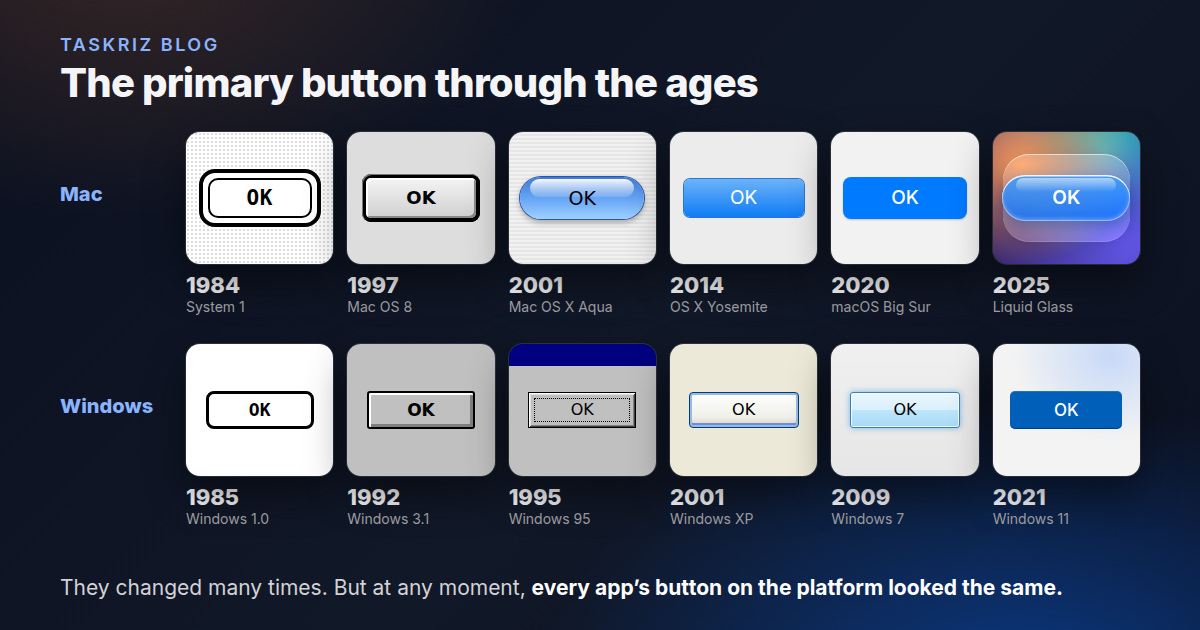
Look at the picture at the top of this post. The Mac’s primary button has changed many times, from the heavy black ring of 1984 to Aqua’s blue gel and today’s Liquid Glass. Windows went from bold outlines to grey bevels, XP’s soft blue and Windows 11’s accent colour. But at any moment in that history, every app’s button on the platform looked the same. When Apple, Microsoft or Google decide how a button looks, every button on their platform should look that way. It’s the customer that matters, not the developer.
The elephant in the room (I love elephants): most companies shouldn’t build a new design system for their business apps just because they can. Leave that to Apple, Google and Microsoft, who spend years and fortunes getting it right. Spend your money removing friction instead.
Generate the code, not a description of it
Here’s the bigger problem. We’re in the age of AI Agents, and A2UI asks them to fill in JSON for a fixed catalog. That isn’t going all in on AI. It’s hedging. It assumes AI can’t be trusted to write the real thing, so we hand it a form to fill in.
AI can write source code today. If it isn’t good enough at something today, it will be tomorrow. A protocol designed around today’s limits locks those limits in.
And nobody will learn A2UI the way we used to learn a tool, one statement and one widget at a time. Those days are over. Just let AI do it.
You have AI, so your job isn’t moving players on the field anymore. It’s moving the goalposts and changing the game. Ask AI for the end goal, not to pave the road towards it. A2UI is a carefully paved first step. We need to see the future, not the first step towards it.
“The best way to predict the future is to invent it.”
Where Taskriz fits
This is why we built Taskriz the way we did. An Agent sends Taskriz source code, not a JSON description: a short Smalltalk program, made from the same building blocks as Apple’s UIKit and laid out by Apple’s Human Interface Guidelines. AI writes it. It runs in a WebAssembly sandbox with no network or file access of its own, each request is sealed to the person’s own devices, and pictures are fetched through Taskriz so their server never learns who looked.
And there’s no app for you to build. Your Agent sends a request, Taskriz takes it to the right person on their phone or computer, now or hours later, and brings the answer back. One consistent experience everywhere, so the people answering never have to learn yours.
We’ve put the two side by side, honestly, in Taskriz and A2UI compared. If you just need a person to answer your Agent, just use Taskriz and move on.
Let’s not forget security
I went looking for the security levels in the A2UI spec. There aren’t any, at least not as levels. What it does define comes down to four things.
- Only the catalog. The Agent can use only components the client already has. It sends data, not code, so it can’t slip its own script into the page.
- Functions by name. Validation and formatting are called by name from the catalog. In 1.0 each function says who may call it (the renderer, the Agent or both), and anything like opening a link must wait for the person to tap.
- Data stays with its Agent. A surface’s data goes back only to the Agent that created it, so one Agent can’t read another’s form.
- Everything else is yours. Transport, sign in, encryption and who may send what to whom are left to whatever carries the messages, such as A2A or MCP.
Some gaps fall to the renderer. Text supports Markdown, and the Lit renderer’s own source says sanitising its HTML is the Markdown renderer’s job. Image, video and audio addresses aren’t checked, so a picture can tell its server who opened a message, and when. The Lit renderer’s README tells developers to treat every UI definition as untrusted and add their own sanitising, Content Security Policy and isolation. Good advice. But it’s advice, not a rule in the spec.
For the client side you have to read another spec. MCP Apps, which runs real web code, says every view must be drawn in a sandboxed iframe on a different origin, behind a proxy, with a Content Security Policy that blocks undeclared domains. A2UI borrows that double iframe when it hosts MCP Apps. Its own comparison sums it up: A2UI is “declarative data, no code execution”, MCP Apps is “sandboxed iframe isolation”.