 Taskriz
Ask Anyone a Question From Google Chat and Get the Answer There
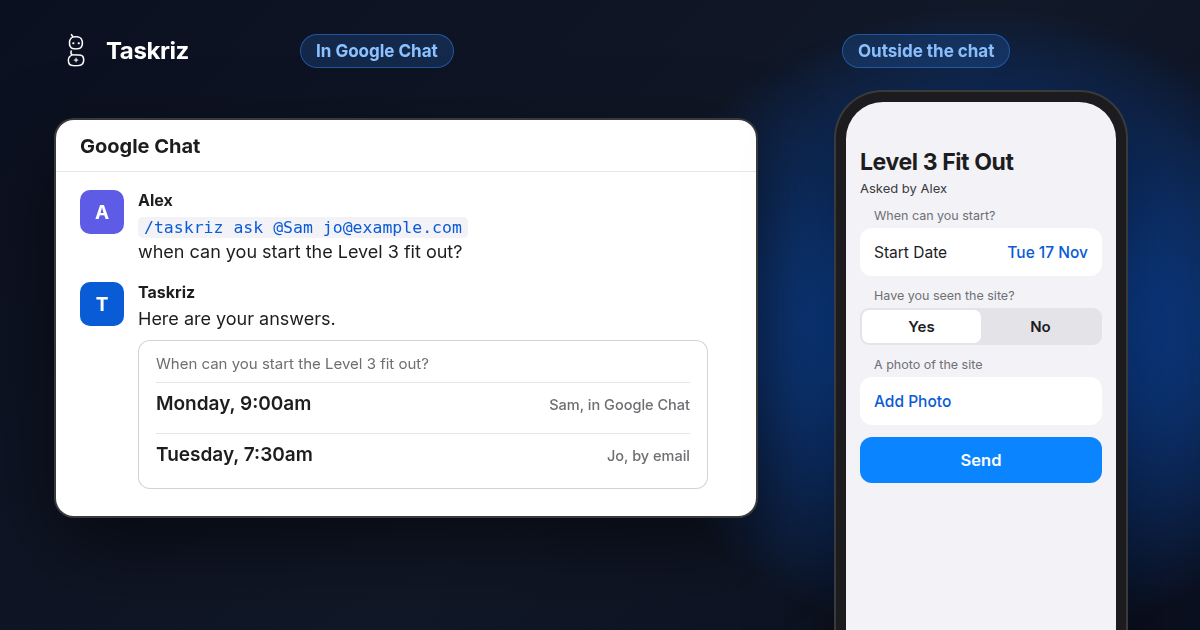
A lot of work in Google Chat stops at a question. Someone needs a date, a price or a yes, so they ask in a space, wait, and ask again. With Taskriz you can ask anyone from Google Chat, your team or people outside your business, and every answer comes back to you right in the chat.
Questions get lost in the scroll
Ask something in a space and you get a thumbs up, two half answers and a reply tomorrow. Ask a supplier or a customer and the question leaves Google Chat altogether. It becomes an email or a phone call, and later someone pastes the answer into the conversation, if they remember.
The work waits while all of that happens. What you wanted was simple: ask the right people the right questions, and have the answers arrive where you are already working.
Ask in one line, right in the chat
Type /taskriz ask, say who you want to ask, and say what you want to know in your own words. For example: /taskriz ask @Sam jo@example.com when can you start the Level 3 fit out?
Taskriz writes the questions and shows them only to you, with Send, Edit and Cancel. Nothing goes to anyone until you tap Send. Prefer to fill something in? Type /taskriz ask on its own and Taskriz offers an Ask Someone button that opens a form.
What arrives is a proper request, not a wall of text: a date picker for “when”, Yes and No for a yes or no question, and a box to type in for the rest. You ask up to 10 people at a time, and each request says who asked.
Your team answers without leaving Google Chat
Colleagues get the request in their chat with Taskriz and answer it right there: choices, dates and times, a few words. When a request asks for a file or photo, they tap Choose and send it from their device in the same chat.
Only the business needs a Taskriz account. Everyone else in your organisation asks and answers as themselves, once Taskriz is in their Google Chat.
People outside Google Chat can answer too
The answers that hold up your work often sit with people who will never be in your Google Chat: a customer, a supplier, a contractor. Add their email or mobile number to /taskriz ask, the same way you name a colleague.
They get the request by email, or by text message in Australia and the United States, and answer in their browser or the Taskriz app. They need no account and have nothing to install. You don’t have to invite them into a space first.
Their answers come back to you in Google Chat, each question with its answer, beside your team’s. If someone declines, or doesn’t answer before the invitation expires, Taskriz tells you that too.
Richer than what Google Chat gives you on its own
Google Chat has useful tools of its own. Its Poll app is handy for a quick vote: one question and up to four choices. Google Forms can hold a longer set of questions, but someone has to build the form and share it, and the responses land in the form or a spreadsheet instead of your chat.
Reaching someone outside your organisation takes more again. They have to be in the conversation, someone without Google Workspace has to accept an invitation and make a guest account, and your admin may have turned external chat off.
Taskriz is richer than what Google Chat offers by itself:
- No form to build. You say what you want to know and Taskriz writes the questions.
- The right control for each question. Dates and times, choices, Yes and No, files and photos, chosen for you.
- Anyone can answer. People in your Google Chat answer in the chat, and everyone else answers by email or text message.
- One place for the answers. They all come back to the person who asked, in the chat, with a private link to view any files.
- Never half a form. Google Chat cards are simpler than Taskriz requests. When a request holds something they can’t show, such as a slider or a video, it arrives as its title and an Open in Taskriz button, and one tap opens the whole thing.
- Requests your team can start. Type
/taskriz, or open the Home tab of your chat with Taskriz, to start what your business offers, such as Book a Van.
One honest limit: a request in Google Chat is a message in Google Chat, so it isn’t end to end encrypted the way it is in the Taskriz app. For anything sensitive, ask for it in the app.
Now in the Google Workspace Marketplace
Google has approved Taskriz, and it is now in the Google Workspace Marketplace. Your Google Workspace admin can install it for everyone or for some groups, or each person can add it themselves: New chat, search for Taskriz, Start chat. Taskriz for Google Chat has the details.