 Taskriz
Human in the Loop Is More Than an Approve Button
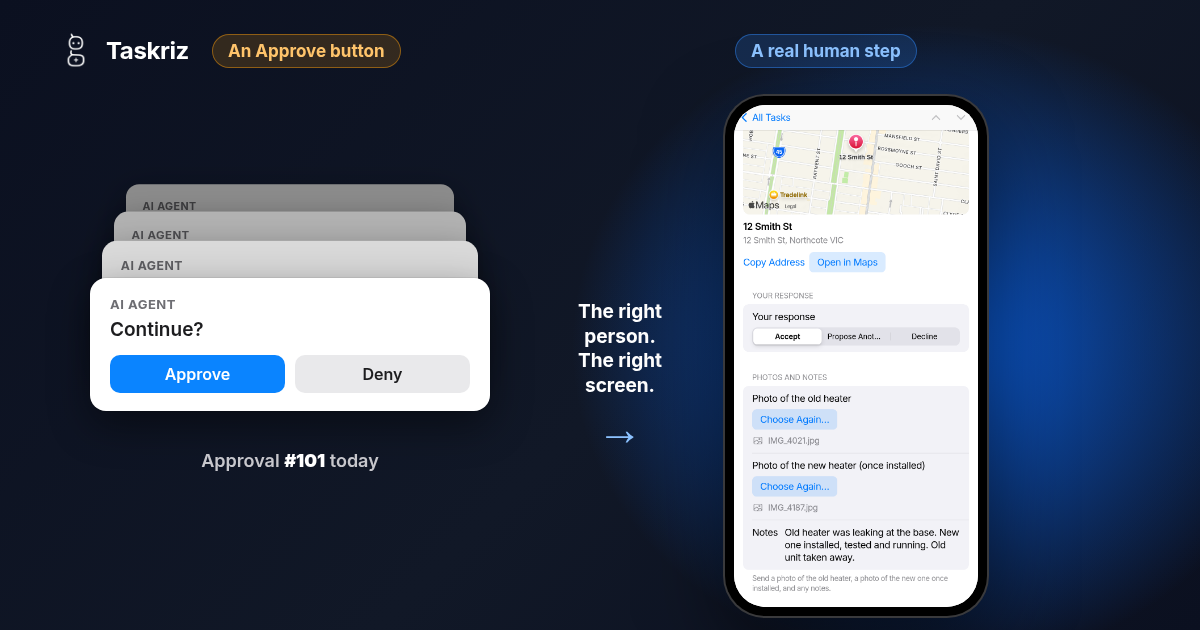
Every serious guide to AI agents now says the same thing: keep a person in the loop. Most of them then describe the same picture: a prompt with a button that says Approve. But the person an agent is waiting on often isn’t in a position to press it, and what the agent needs from them is usually more than a yes.
Everyone agrees agents need a person
The surveys show why. In VentureBeat’s June 2026 VB Pulse survey of 157 enterprises, half had shipped an agent or AI feature that passed its own tests and still failed customers. Two thirds already let some changes reach production without a person reviewing them, yet only 5% said they fully trust the automated checks making those calls (VentureBeat, July 2026). By August, the share of companies running agents that expect to keep a person’s approval had risen from 20% to 42% (VentureBeat, October 2026). The surveys are of people who chose to answer, so read the numbers as a direction rather than a census. The direction is clear.
Regulators are heading the same way. Article 14 of the EU AI Act requires high risk AI systems to be designed so that people can effectively oversee them while they are in use. A provisional agreement in May 2026 moved those obligations for most high risk systems to December 2027, once it is formally adopted (Gibson Dunn). The date moved. The requirement didn’t. Article 14 is about the people who oversee an AI system, not the customers and contractors an agent works with. But it shows where expectations are going: a person, with the context to judge, at the moments that matter.
Then it shrinks to a button
In practice, human in the loop has come to mean one thing: the agent wants to send, delete, pay or publish, so it pauses, and someone on the team clicks Approve or Deny.
That works for the first few. Then it becomes noise. One engineer writing about approval patterns put it plainly: “review quality collapses when approvals are frequent” (10 HITL Tool Approval Patterns for AI Agents). Writing in SiliconANGLE, Jason Bloomberg goes further and argues that “HITL is fundamentally flawed”, because people rubber stamp what they don’t have the time or the context to judge (SiliconANGLE).
An Approve button with no context isn’t oversight. It’s a speed bump.
The person your agent needs usually isn’t in the room
Most human in the loop tools assume the human is an operator: someone watching a dashboard or a Slack channel, ready to say yes.
Now look at what agents actually wait on in a business. A customer confirming a booking. A contractor sending a photo and a start date. A supplier quoting a price. A manager approving a quote from their phone between meetings. These people aren’t in the agent’s chat. Many of them don’t work for you. And what the agent needs from them is rarely just a yes. Often it’s information: a photo, a price, a date. Even a real approval needs the quote, the photos and the reason in front of the person deciding.
What a real human step needs
Three things, and the Approve button has only the last of them half right.
Reach the person where they are. By email or text message, opening straight to the request, with no app to install and no account to create. If answering takes a login, the agent waits.
Give them a screen made for the decision. The facts they need to decide well, and the right way to answer: a date to pick, a photo to add, a price to enter, a choice to make. Context is what turns a click into a decision.
Bring the answer back as data. The agent pauses, the person answers when they can, and the answer arrives as fields and files the agent can act on, not a message someone has to read and type in again.
Generative UI solves a different problem
A lot of energy is going into letting agents draw their own interfaces. Google’s A2UI reached version 0.9 in April 2026 (Google Developers Blog), and MCP Apps lets an MCP server show an interactive view inside a chat. Both decide how an interface is drawn inside a host, and both assume the person is already in the conversation. Taskriz works alongside them: it handles the person who isn’t, bringing the request to them and the answer back to the agent.
That person needs the interface to come to them, made for this one request, and the answer to find its way back. We compare the approaches on our A2UI page.
What it looks like
In this one minute example, a property manager asks a plumber, in plain words, to install a hot water heater. Taskriz builds the request with the address on a map. The plumber, who has no account, answers from a phone with two photos and a note, and the answer comes back. An AI agent does the same through the Taskriz MCP server or API, and carries on when the answer arrives.
A checklist for human steps
- Pause for what is risky or can’t be undone, and let routine work run.
- Ask for information, not just permission.
- Show the context the person needs to decide.
- Send it to the person who can actually answer, where they already are.
- Set a deadline, and decide what happens if nobody answers.
- Keep every answer, with who gave it and when.
The interface is only part of the problem
Drawing a form is the easy part. The work is everything around it: getting the request to someone who has no account with you, by the channel they actually read; keeping it private on the way; holding the agent’s place while the person takes a day to answer; a deadline, after which the request closes; the photos and documents that come back with the answer; knowing it was delivered, read and answered; and handing all of it back to the agent as data. Each piece is small. Together they are a product, and every team building an agent ends up building it again.
Where Taskriz fits
Taskriz is the human step for AI agents and business software. It sends a person the screen for the moment, by email, text message, the Taskriz app, Slack or Google Chat, and brings their answer back to your agent as data. Connect it through the MCP server, the API or the plugins for Claude and ChatGPT. For the steps, with a prompt and an API example, see How an AI agent gets a person’s approval.