 Taskriz
Stop Chasing Contractors for Photos, Quotes and Approvals
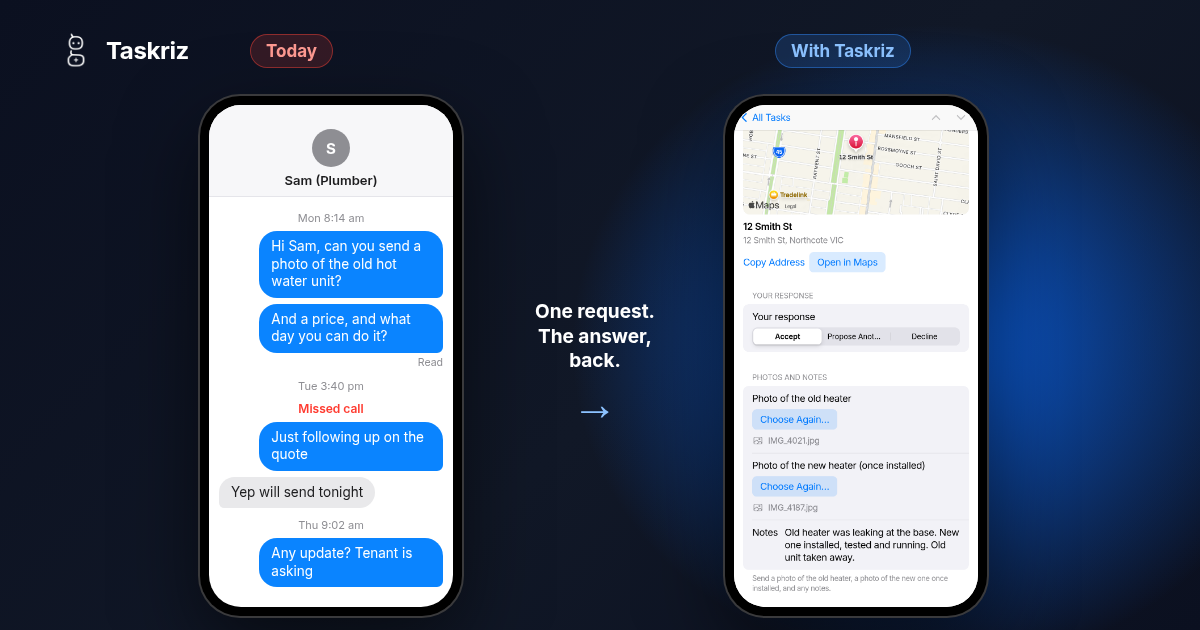
The job is ready to go. It’s waiting on a photo, a price, a start date or someone’s OK, and the person you need it from doesn’t work for you. So you chase.
The chase
You text the plumber for a photo of the old unit. You email the supplier for a quote. You call the builder to ask what day the crew can start, and leave a message. A day later you text again: just following up. Then the tenant, the owner or your manager asks for an update, and you have nothing to tell them.
When the answers do arrive, they come in pieces and in different places. The price is in an email, the photo is in a text, the start date was said on a call. Someone has to gather it all up, type it into the job and hope nothing was missed.
Why a form doesn’t fix it
The usual fix is a form. Send everyone the same link, and the answers come back in one shape. It helps, but it doesn’t stop the chase.
A form waits for someone to go and find it. It’s the same for every job, so it asks for everything except the one thing this job needs, and the link sinks to the bottom of an inbox with all the others. Now you’re chasing someone to fill in a form.
A portal is worse: one more login that a busy contractor won’t create. A group text gets quick replies, but every one of them is a message someone has to read and type in again. A chatbot turns a simple request into a conversation, when all you wanted was a photo.
Ask for exactly what this job needs
You already know what each job needs. For a hot water heater, it’s the address, a photo of the old unit, a photo of the new one once it’s in, and any notes. For a quote, it’s the price, what’s included and when the work can be done. Ask for those, and only those.
Then make the answer easy to give. A button to add a photo, rather than “send me a pic”. Days to choose from, rather than “when suits?”. The address on a map, so nobody has to ask where the job is.
Send it to the person, not to a page
The request should go to the person who has the answer, by email or text message, and open straight to one screen made for that job. No app to download. No account to create. They answer from their phone while they’re standing in front of the old unit, and it’s done.
That’s the part a form can’t do. A form waits for people to come to it. A request goes to them, already filled in with what you know, asking only for what you don’t.
One minute, start to finish
Here’s how that looks in Taskriz. A property manager asks a plumber, in plain words, to install a hot water heater. The plumber has no account. They see the job with its address on a map, add two photos and a note, and the answer comes back to the property manager.
Bring the answer back to the job
The answer should land in one place and be complete: every question answered, the photos attached, with who sent it and when. Not five messages to piece together. From there it can be acted on, passed on or turned into the next request, like a question about the old unit or approval of the invoice, without starting the chase again.
A checklist you can use today
With or without Taskriz, these make the chase shorter:
- One request per job, sent to the one person who can answer it.
- Ask only what this job needs. Everything else is noise.
- Ask for a photo, not a description of one.
- Offer days to choose from, instead of asking when suits.
- Put the address on a map.
- Say when you need the answer, and why.
- Keep every answer, photo and note in one place, with the job.
Where Taskriz fits
Taskriz sends the people you work with a request made for the moment, and brings the answer back to you. It’s not a chatbot, and it isn’t another form to chase. Write what you need in plain words and Taskriz builds the screen they answer on.
See how it works for property management, or ask from Slack or Google Chat if that’s where your team works. If you make software for businesses like these, Taskriz can do the same from inside your product: see For Software Companies.